· Andrei M. · Integrations · 15 min read
Dynamics 365 to E-commerce: Power Wholesale Operations with MicroPIM
Connect Dynamics 365 to your e-commerce channels for wholesale operations. Manage B2B pricing tiers, multi-channel exports, and real-time inventory sync.
Wholesale distributors running Microsoft Dynamics 365 have a well-structured ERP system at the center of their operations. Pricing is accurate, inventory is tracked across warehouses, and procurement runs on reliable data. What Dynamics 365 was never designed to do is feed that operational data into Shopify, PrestaShop, or eMag with the speed that B2B e-commerce now demands.
When a buyer from one of your wholesale accounts visits your online store, they expect customer-specific pricing, accurate stock levels, and product information that matches what is in their purchase order. Delivering that experience from a Dynamics 365 setup — without manual export steps, without spreadsheet intermediaries, and without stale data — requires a dedicated layer between your ERP and your sales channels.
MicroPIM is that layer. It authenticates against your Dynamics 365 environment, pulls product masters and inventory, applies customer-specific wholesale pricing through B2B Catalogues, and pushes synchronized data to multiple e-commerce channels simultaneously.
Wholesalers Need Speed: Why Dynamics 365 Alone Is Not Enough
Dynamics 365 is purpose-built for operational accuracy. It handles financial posting, purchase orders, warehouse movements, and vendor terms with a level of rigor that e-commerce platforms cannot match. That rigor, however, comes at a cost when your sales channels need product data at speed.
Adding a new item in Dynamics 365 typically means filling out the item card, assigning a posting group, configuring pricing, and setting warehouse parameters. Before that item reaches a Shopify storefront or a PrestaShop catalog, someone still needs to write a product description, upload images, create SEO metadata, and manually enter the data into the e-commerce backend — or run a custom export and hope the field mapping holds.
For a business with a few hundred SKUs, this workflow is inconvenient. For a wholesale distributor managing thousands of product lines across multiple customer segments, it becomes a genuine bottleneck. New products launch late, pricing updates lag behind changes made in the ERP, and overselling occurs because inventory figures on the storefront are hours or days behind warehouse reality.
The core problem is not that Dynamics 365 lacks good data. It is that the ERP data model and the e-commerce data model serve different purposes, and there is no native bridge between them. MicroPIM builds that bridge.
The Wholesale E-commerce Gap
B2B buyers increasingly expect the same experience they get as consumers. They want to log in, see their specific contract pricing, browse a catalog filtered to their product access level, and check out without calling a sales representative. This is the standard that platforms like Amazon Business and Alibaba have set — and it is now the benchmark your wholesale portal is measured against.
The challenge for distributors using Dynamics 365 is that B2B pricing logic lives entirely inside the ERP. Dynamics 365 supports price lists, customer price groups, line discounts, and tiered pricing structures that can be extremely detailed. None of that logic is natively consumable by a Shopify or PrestaShop storefront.
The typical workaround is to create separate Shopify stores for different customer segments, each with a manually maintained price list, and hope that prices stay synchronized with Dynamics 365. This approach does not scale. The moment a price changes in the ERP, every manually maintained channel list is out of date.
MicroPIM’s B2B Catalogues feature closes this gap by making customer-specific pricing a first-class part of the product publishing workflow. Wholesale pricing tiers defined in or imported from Dynamics 365 attach to the catalog record and flow to the correct channel without requiring a separate manual step. You can read more about the B2B catalogue approach in the dedicated B2B catalogues for wholesale guide.
MicroPIM Closes the Loop: Dynamics 365 to Shopify, PrestaShop, and eMag
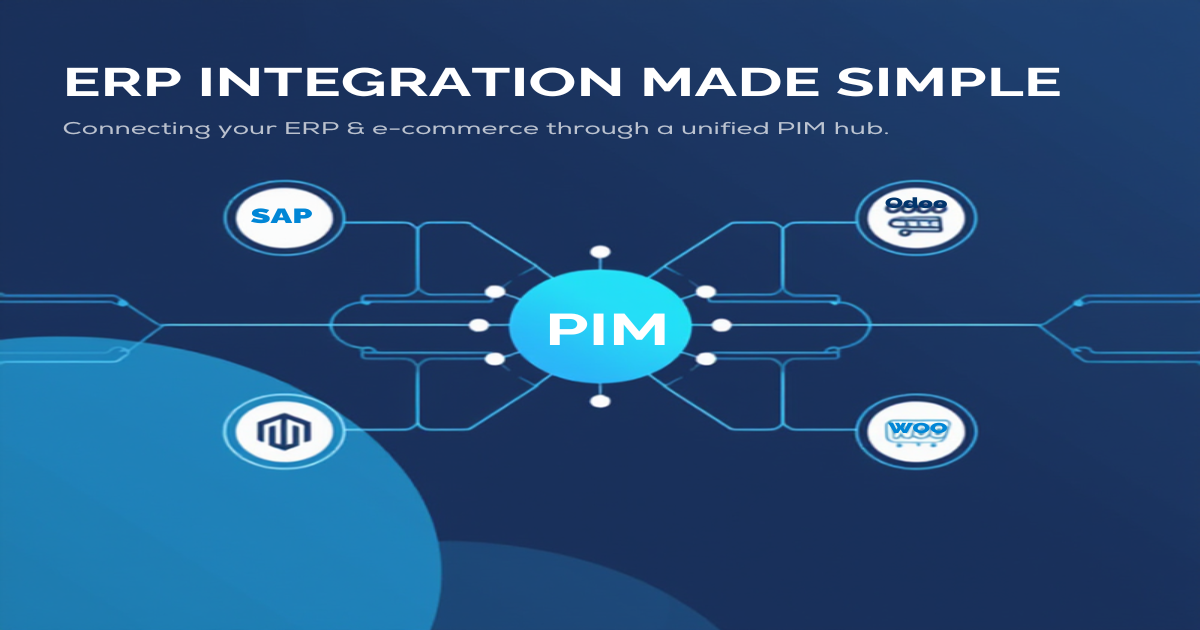
MicroPIM sits between Dynamics 365 and your e-commerce channels, acting as a central product hub. Data flows in from the ERP, gets enriched with marketing content, pricing rules, and media, and flows outward to every connected channel through dedicated sync queues.
The practical effect is that your ERP team continues working exactly as before — managing items, setting prices, and running warehouse operations inside Dynamics 365. Your content team works inside MicroPIM, adding descriptions, uploading images, and reviewing AI-generated translations. And your e-commerce channels receive synchronized, complete product data automatically.
For wholesale operations specifically, MicroPIM adds a dimension that a standard ERP-to-channel sync cannot provide: the ability to apply B2B-specific pricing, customer access controls, and catalog segmentation on top of the Dynamics 365 product master, before the data reaches any storefront.
This is not a one-time export. It is an ongoing, bidirectional relationship where Dynamics 365 owns the operational truth and MicroPIM manages the commercial presentation of that truth across channels.
Authenticating Dynamics 365: Azure AD, OAuth2, and API Permissions
Connecting MicroPIM to Dynamics 365 uses Microsoft’s standard authentication infrastructure. There is no custom middleware to install and no agent to deploy inside your Dynamics 365 environment. The connection is established through Azure Active Directory using OAuth2 and the Microsoft identity platform.
The setup requires registering MicroPIM as an application in your Azure AD tenant. This is a standard Azure AD app registration that your IT administrator can complete in a few minutes from the Azure portal. During registration, you grant the application the API permissions it needs to read item master data, inventory records, and pricing information from your Dynamics 365 instance. The permission scopes follow the principle of least privilege — MicroPIM requests read access to the specific Dynamics 365 business data entities it needs and nothing more.
Once the app registration is complete, you provide MicroPIM with the tenant ID, client ID, client secret, and the Dynamics 365 environment URL. MicroPIM uses these credentials to obtain access tokens through the OAuth2 client credentials flow, which means no user login is required for the ongoing sync. The integration runs as a service-to-service connection using the permissions you have explicitly granted.
For organizations on Dynamics 365 Business Central rather than Finance and Operations, the same OAuth2 approach applies. MicroPIM’s Dynamics 365 connector supports both editions through the respective OData APIs, with environment-specific configuration for Business Central online, Business Central on-premise, and Dynamics 365 Finance and Operations. You can find a broader overview of product management patterns in the Dynamics 365 product management guide.
Syncing Product Masters: Items, Descriptions, and Categories from D365
Once the authentication is configured, MicroPIM begins pulling product master data from your Dynamics 365 environment. The sync covers the full operational profile of each item, mapping Dynamics 365 fields to MicroPIM’s product model.
| Dynamics 365 Field | MicroPIM Field | Description |
|---|---|---|
| Item No. | sku | Item number as the unique product identifier |
| Description | name | Primary item description becomes the product name |
| Unit Price | price | Base sales price synced to all channels |
| Unit Cost | costPrice | Purchase cost for margin reporting |
| Costing Method | costValuationMethod | Standard, Average, FIFO, or LIFO |
| Country/Region of Origin | countryOfOrigin | ISO country code for compliance |
| Gross Weight | weight | Item weight for shipping calculations |
| Base Unit of Measure | purchaseUom | Purchase unit of measure |
| Vendor Item Description | purchaseDescription | Supplier-facing description |
| Gen. Prod. Posting Group | taxClassificationCode | Tax posting group for VAT assignment |
| Tariff No. | intrastatCode | Intrastat CN8 code for EU trade reporting |
| Lead Time Calculation | supplier.leadTimeDays | Vendor lead time in days |
| Minimum Order Quantity | supplier.minimumOrderQuantity | Minimum order quantity per vendor |
| Item Category Code | category | Product category hierarchy |
| Reorder Point | reorderPoint (warehouse) | Reorder threshold per location |
| Location Code | warehouse (multi-warehouse) | Maps D365 locations to MicroPIM warehouses |
| User-Defined Extensions | integrationData (JSON) | Custom fields stored as structured JSON |
Category data from Dynamics 365 maps to MicroPIM’s category tree, which can be independently structured per channel. Your Dynamics 365 item categories become the foundation of the catalog hierarchy, but MicroPIM allows you to remap categories per channel — so the same item might appear under a different category path in Shopify than it does in PrestaShop, without altering the ERP record.
Short descriptions from Dynamics 365 land in the product name and base description fields. From there, MicroPIM’s AI content tools can generate long-form e-commerce descriptions, SEO meta titles, and meta descriptions that are appropriate for a product page rather than a warehouse item card. The ERP data provides the foundation; MicroPIM provides the commercial presentation layer.
Custom fields specific to your Dynamics 365 configuration are captured in the integrationData JSON field. This means no custom schema changes are required in MicroPIM to accommodate fields that are unique to your ERP setup, and those values remain accessible for conditional logic or channel-specific mapping.
Wholesale Pricing Tiers: B2B Customer-Specific Pricing Through MicroPIM B2B Catalogues
For wholesale distributors, pricing is not a single number on a product record. It is a matrix: different prices for different customer groups, volume tiers, contract terms, and seasonal promotions. Dynamics 365 supports this complexity through its price list and customer price group system. The challenge is surfacing that complexity correctly in an e-commerce environment.
MicroPIM’s B2B Catalogues feature is designed specifically for this use case. A B2B Catalogue in MicroPIM is a scoped product catalog with its own pricing rules, customer access credentials, and product visibility settings. You can create as many catalogues as your wholesale customer segmentation requires — one per key account, one per customer tier, or one per market — and each catalogue can carry pricing that differs from the base price imported from Dynamics 365.
The workflow for wholesale pricing looks like this:
- Base prices sync from Dynamics 365. The standard price list imported from the ERP populates the base price field on each MicroPIM product.
- B2B Catalogues apply tier pricing. For each wholesale customer group or key account, you create a B2B Catalogue and apply either a percentage discount, a fixed price override, or a volume-based pricing rule on top of the base price.
- Customer access credentials control catalog visibility. Each B2B Catalogue can be assigned login credentials. When a wholesale buyer authenticates on your Shopify or PrestaShop storefront using their account credentials, they see only the products and prices that belong to their catalog assignment.
- Price changes in Dynamics 365 propagate automatically. When a base price changes in the ERP, the B2B Catalogue pricing rules recalculate against the new base, so your tier pricing stays accurate without manual intervention.
This architecture means you do not need to maintain separate Shopify stores for each customer segment. A single storefront can serve multiple wholesale accounts simultaneously, each with a private catalog view and customer-specific pricing — all driven by the data that already exists in Dynamics 365.
For businesses that use Dynamics 365’s Customer Price Groups, MicroPIM can import those price group structures directly and map them to B2B Catalogue definitions, reducing the setup effort required to replicate your ERP pricing logic in the e-commerce environment.
Multi-Channel Export: Push to Shopify, PrestaShop, and eMag Simultaneously
Once product data is enriched and pricing catalogues are configured, MicroPIM publishes to all connected channels through a queue-based export system. Each channel has its own sync queue, which means a large export to eMag does not block or delay the concurrent Shopify sync.
MicroPIM supports native integrations with the channels most relevant to wholesale distributors in the European market:
Shopify receives products with full variant support, wholesale pricing via Shopify’s B2B or price list features, inventory levels mapped from MicroPIM warehouses to Shopify locations, and metafields for any custom attributes your storefront uses. MicroPIM manages the Shopify OAuth connection and API versioning automatically.
PrestaShop integration covers products, combinations (variants), categories, features, and attribute groups. For wholesale operations on PrestaShop, MicroPIM maps customer group pricing from B2B Catalogues to PrestaShop’s native customer group price system, so the pricing tier logic carries through to the storefront checkout.
eMag integration supports product listings on the eMag marketplace with field mapping to eMag’s product schema, category path assignment, and price updates. For Romanian wholesale distributors selling through eMag’s marketplace, MicroPIM handles the transformation from Dynamics 365 item fields to eMag’s required data structure, including the Romanian-language fields and regional taxonomy categories.
A product change in Dynamics 365 — a price update, a description change, or a new image — triggers a sync event in MicroPIM. That event is placed on each channel’s export queue and processed in sequence, with retry logic for transient API failures. The result is that all three channels reflect the same product state within minutes of a change in the ERP, without any manual action from your team.
For wholesale distributors who also operate on other channels — Magento, WooCommerce, or regional marketplaces — MicroPIM’s multi-channel architecture accommodates additional channel connections without changing the core Dynamics 365 sync or the B2B pricing setup. You can learn more about building a multi-channel strategy in the multi-channel e-commerce strategy guide.
Real-Time Inventory Across Channels: Warehouse Quantities Distributed to All Platforms
Inventory accuracy is particularly consequential in wholesale e-commerce. A B2B buyer placing a large order expects that the quantities shown at checkout are reliable. Overselling in a B2C context is an inconvenience; overselling to a wholesale account that needs the stock to fulfill their own retail orders is a relationship-damaging failure.
Dynamics 365 provides location-based inventory through its warehouse and location structure. Each item carries quantities per location, with committed stock (reserved against open sales orders), available-to-promise quantities, and reorder points. MicroPIM maps this structure to its own multi-warehouse model directly.
Each Dynamics 365 location maps to a named warehouse entity in MicroPIM. When inventory changes — a purchase order receipt posts, a sales order picks stock, or a transfer moves inventory between locations — the updated quantities flow from Dynamics 365 into MicroPIM’s warehouse records and are then distributed to each connected e-commerce channel through the sync queue.
For wholesale operations with multiple fulfillment warehouses, MicroPIM gives you explicit control over which warehouse feeds stock to which channel. A central distribution warehouse might feed all three channels — Shopify, PrestaShop, and eMag — while a regional warehouse feeds only the local channel. This configuration happens in MicroPIM without requiring any changes to your Dynamics 365 warehouse structure.
The reorder point field from Dynamics 365 carries through to MicroPIM’s warehouse records as well. Product managers can see at a glance which items are approaching reorder threshold across all warehouses from inside MicroPIM, without logging into the ERP — a useful shortcut during the day-to-day publishing workflow.
For businesses where stock position changes frequently due to high-volume wholesale order flow, MicroPIM’s inventory sync can be scheduled at short intervals or triggered by webhook events, depending on the Dynamics 365 configuration. This keeps e-commerce channel stock figures as close to real-time as your ERP infrastructure supports.
You can find a detailed treatment of multi-warehouse inventory architecture in the multi-warehouse inventory sync guide and additional ERP integration context in the best ERP e-commerce integration overview.
Getting Started
Connecting Dynamics 365 to MicroPIM for wholesale e-commerce operations follows a structured setup path that most teams can complete within a working day.
Step 1: Azure AD app registration. Register MicroPIM as an application in your Azure AD tenant and grant the required API permissions for Dynamics 365. Your IT administrator handles this in the Azure portal; MicroPIM’s integration documentation provides the exact permission scopes required for each Dynamics 365 edition.
Step 2: Configure the MicroPIM integration. Enter your Azure AD credentials (tenant ID, client ID, client secret) and your Dynamics 365 environment URL in the MicroPIM Integrations screen. MicroPIM validates the connection and performs an initial product master import.
Step 3: Review field mapping and categories. Confirm the field mapping between your Dynamics 365 item fields and MicroPIM product fields. Adjust category mappings per channel if your e-commerce category structure differs from your ERP item categories. Any custom Dynamics 365 extensions are captured in the integrationData field automatically.
Step 4: Create B2B Catalogues. Set up catalogues for each wholesale customer segment. Apply pricing rules against the base prices imported from Dynamics 365. Assign customer access credentials to each catalogue.
Step 5: Connect your sales channels. Configure Shopify, PrestaShop, eMag, or your combination of channels from the Integrations screen. Define warehouse-to-channel inventory routing.
Step 6: Enrich and publish. With ERP data in MicroPIM and channels connected, use AI content generation to produce marketing-quality descriptions, generate or enhance product images, and queue translations for each language your storefronts require. Publish to all channels simultaneously.
From that point, ongoing operations are largely automated. Price and inventory changes in Dynamics 365 propagate to all channels on the sync schedule you define. New items added in the ERP appear in MicroPIM automatically. Your content team adds descriptions and images inside MicroPIM, and the finished product reaches every channel without touching the ERP again.
Wholesale distributors running Dynamics 365 already have the operational foundation for multi-channel e-commerce. The gap is not in the ERP data — it is in the tooling that transforms that data into customer-ready product information, applies B2B pricing rules, and keeps every channel synchronized without manual effort.
MicroPIM closes that gap by authenticating directly against your Dynamics 365 environment, mapping item master fields to a channel-ready product model, managing wholesale pricing tiers through B2B Catalogues, and pushing synchronized inventory and product data to Shopify, PrestaShop, and eMag simultaneously.
Ready to see how this works with your Dynamics 365 catalog and your specific wholesale pricing structure? Book a demo and we will walk through the integration, B2B catalogue configuration, and multi-channel export using your own data.
Also in this series: SAP Business One integration, NetSuite integration, Odoo product sync, Pluriva integration, and Dynamics 365 product management.