· Andrei M. · Data Quality · 12 min read
Demoted, Not Rejected: How Missing Product Data Quietly Throttles Your Shopify, Google & Meta Listings
A Shopify listing can sit "Active" in your admin while Google, Facebook, and Instagram quietly stop showing it, all because one required attribute like gender or age group is missing. Here is how to catch it before it costs you traffic.
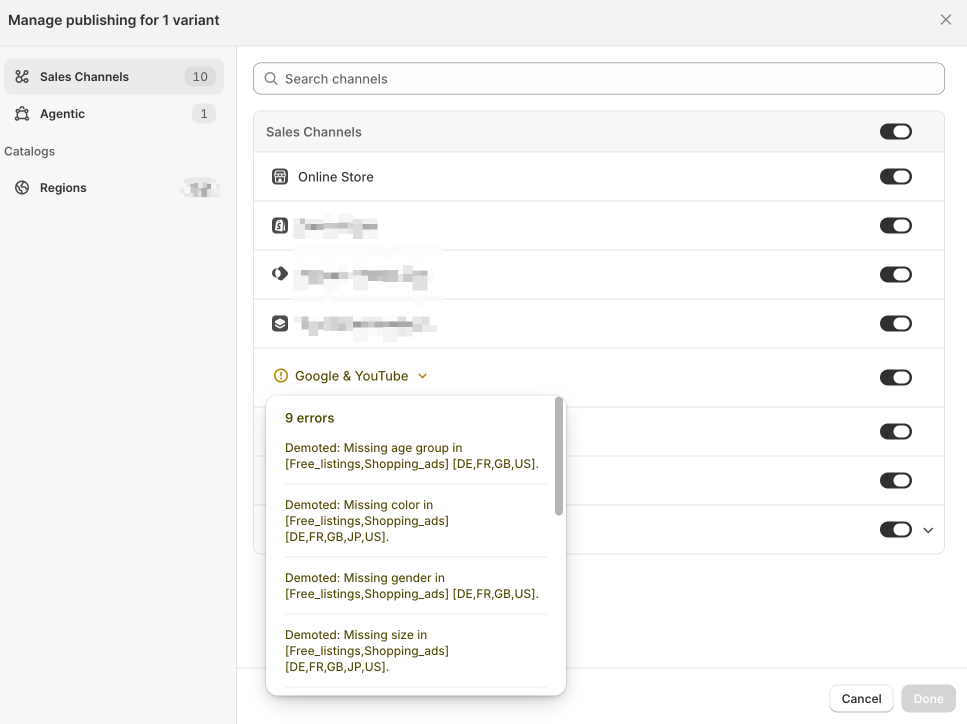
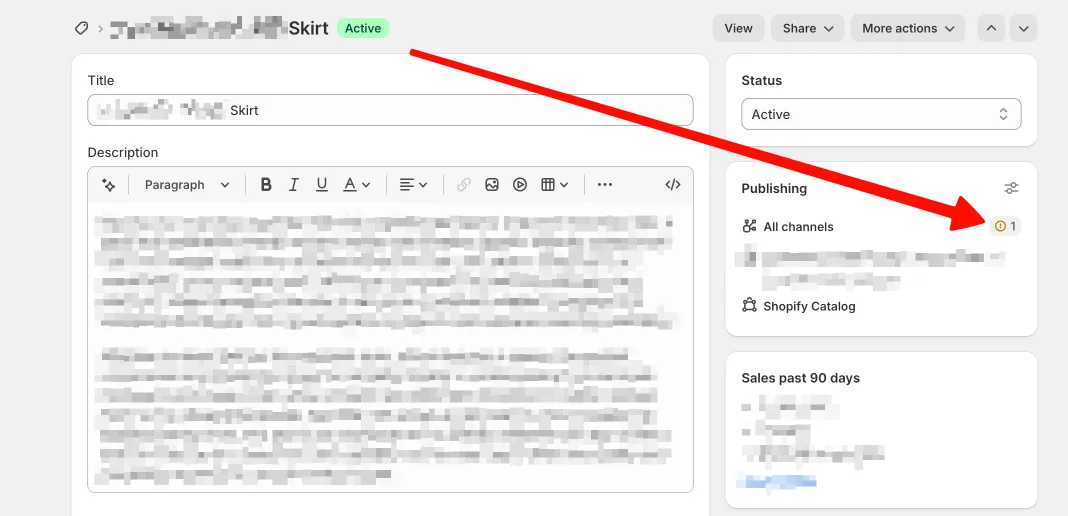
Open a product in Shopify and everything looks healthy. The status says Active. The title is filled in, the description reads well, the price is set, and the product is published to every sales channel you sell on. As far as your admin is concerned, this skirt is live and working for you.
Then you notice a tiny detail in the Publishing panel: All channels has a small amber warning icon next to it, and a single number. One. It is easy to scroll straight past, because nothing about the product looks broken. Nothing has stopped. No email arrived. No red banner. The product is still “Active.”
That one icon is the difference between a listing that is selling and a listing that is quietly invisible. This is not a feed-rejection problem, where a product fails to publish and you get a loud error. If that is what you are dealing with, read Why Is My Product Feed Getting Rejected? instead. This is the opposite failure mode: a product that stays published, stays “Active,” and still loses most of its reach.
AEO answer: A product listing gets “demoted” when required attributes like gender, age group, color, or size are missing. The item stays published and technically live, but Google Shopping, Shopify sales channels, and Meta Shops sharply cut its visibility or hide it entirely, without ever flagging an error you would notice in your admin.
Demoted vs. Disapproved: Why “It’s Still Live” Doesn’t Mean It’s Fine
Most sellers audit for the loud failure. A product gets disapproved, it disappears from a surface entirely, and the reason usually lands in your inbox. You fix it, you resubmit, and it comes back. Disapproval is painful, but at least it is visible.
Demotion is the quiet one. Google’s Merchant Center diagnostics treat a demoted product as still eligible to show, but with sharply reduced impressions and clicks on the surfaces where the data is incomplete. The listing is not removed. It is buried. And because the product still reads as “published” in Shopify and still appears in a casual glance at Merchant Center’s overview, nobody on your team is prompted to look. A warning today can also escalate into a full disapproval later if it is never resolved.
The three platforms most sellers rely on handle this very differently, which is exactly why it is confusing:
| Status | Platform | What happens | Where it shows |
|---|---|---|---|
| Demoted | Google Free listings / Shopping ads | Stays live, impressions and clicks suppressed | Merchant Center diagnostics |
| Disapproved | Google Free listings / Shopping ads | Removed from that surface | Merchant Center diagnostics |
| Item Rejected | Meta Shops (Facebook / Instagram) | Removed from all Meta commerce surfaces | Commerce Manager |
| Publishing warning | Shopify sales channel | Product active, one channel flagged | Product page Publishing panel |
The takeaway: “it’s still live” tells you almost nothing about whether it is actually being shown to shoppers. A live, demoted listing can lose the majority of its traffic while looking perfectly fine in every dashboard you check daily.
Anatomy of a Demotion: Reading Shopify’s “9 Errors” Warning
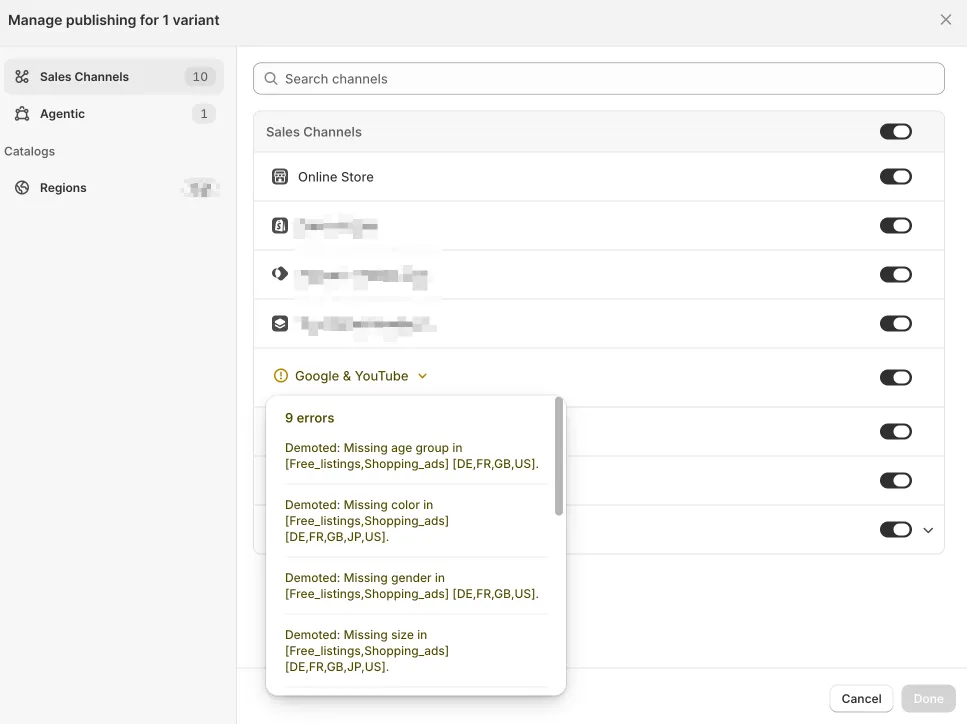
Click into that one warning and Shopify opens the Manage publishing view. Expand the Google & YouTube channel and the single amber icon turns into something far more specific: nine errors on one variant.
Read the messages literally, because every word is doing work:
- Demoted: Missing age group in [Free_listings, Shopping_ads] [DE, FR, GB, US]
- Demoted: Missing color in [Free_listings, Shopping_ads] [DE, FR, GB, JP, US]
- Demoted: Missing gender in [Free_listings, Shopping_ads] [DE, FR, GB, US]
- Demoted: Missing size in [Free_listings, Shopping_ads] [DE, FR, GB, JP, US]
Two details matter more than the missing fields themselves.
First, the [Free_listings, Shopping_ads] tag. This single gap is not costing you one thing, it is costing you two at once. Free listings are your organic Shopping placement, the results you do not pay for. Shopping ads are the placements you pay for. A missing attribute demotes both simultaneously, so you are losing organic reach and getting less out of every ad dollar on the same product at the same time.
Second, the market codes: [DE, FR, GB, JP, US]. Attribute requirements are set per market, not globally. The same skirt can be completely fine in one country and demoted in four others, because Germany, France, Great Britain, Japan, and the United States each enforce their own required set for apparel. One product record, five different verdicts. This is why a spot check in your home market can look clean while the product bleeds traffic everywhere else.
Why Apparel Takes the Hardest Hit: “Recommended” Fields That Aren’t Optional
Apparel is the category where this hurts most, and it is a trap of definitions. In Google’s product data specification, the Apparel & Accessories category (category 166) leans on a specific attribute set: gender, age group, color, size, material, and pattern. Google’s own apparel guidance and the gender and age group attribute pages describe most of these as “recommended.”
In practice, “recommended” is misleading. In markets like DE, FR, GB, and US, these fields function as gating requirements for Free listings and Shopping ads eligibility. Leave them blank and the product is not politely nudged down the rankings, it is demoted out of competitive visibility. As feed specialists at DataFeedWatch note, these are the attributes that make or break fashion visibility.
| Attribute | Google’s label | Practical effect if missing | Markets confirmed affected |
|---|---|---|---|
| gender | Recommended | Demoted on Free listings + Shopping ads | DE, FR, GB, US |
| age_group | Recommended | Demoted on Free listings + Shopping ads | DE, FR, GB, US |
| color | Recommended | Demoted on Free listings + Shopping ads | DE, FR, GB, JP, US |
| size | Recommended | Demoted on Free listings + Shopping ads | DE, FR, GB, JP, US |
| material | Recommended | Elevated disapproval risk | Varies by category |
| pattern | Recommended | Elevated disapproval risk | Varies by category |
Requirements also diverge by marketplace, not just by product category, which multiplies the problem the moment you sell in more than one place. For that side of the story, see handling conflicting category and attribute requirements across marketplaces.
One Missing Field, Three Different Outcomes
Here is the part that catches teams off guard: the same missing attribute produces a different outcome depending on the channel. One blank gender field is not one problem, it is three problems wearing different masks.
Shopify Sales Channels: The Warning Sits One Click Deep
Shopify surfaces the issue as a single warning icon on the product’s Publishing panel. There is no catalog-wide “these products are demoted” report in the standard product view. Across a catalog of a few hundred or a few thousand SKUs, that means the signal exists but is effectively hidden. You would have to open each product, expand each channel, and read each error list to find them all. Almost nobody does that at scale, which is exactly how demoted products pile up unnoticed.
Google & YouTube (Free Listings + Shopping Ads): Silent Throttling
On Google, the product is not removed, it is throttled. Impressions and clicks are suppressed on the affected surfaces while the listing continues to “pass” a casual review of the Merchant Center overview. There is no dramatic drop-to-zero, just a steady underperformance that looks like soft demand rather than a data defect. That ambiguity is what keeps it from being diagnosed.
Meta Shops (Facebook & Instagram): No Middle Ground
Meta has no demotion tier at all. The same missing attribute that quietly throttles your Google traffic will get the product flagged Item Rejected in Commerce Manager, and a rejected item is hidden across Facebook Shop, Instagram Shop, and Marketplace at once. Same root cause, binary outcome. On Google you slowly lose reach; on Meta you lose the listing entirely. Neither one waits for you to notice.
For the operational side of running the same catalog cleanly across all of these, see how to connect your product catalog to multiple marketplaces.
The Business Cost of Listings Nobody Notices Are Underperforming
Demotion is easy to underrate precisely because it is silent. The cost does not arrive as a single dramatic event, it accumulates across live, “active” listings that no error email ever mentions. The numbers make the case:
- Mid-market retailers lose roughly 23% of potential revenue to poor product data, according to aggregated data-quality research.
- Product data errors drive up to a 23% loss in clicks and a 14% loss in conversions, per McKinsey analysis cited by GoDataFeed.
- Around 7% of products submitted to Google Shopping are disapproved outright, before you even count the demoted ones still sitting live and underperforming.
- Merchants with 98% or higher feed approval see about 22% higher impression share than those with lower approval rates.
- 54% of shoppers abandon a purchase when they hit product data that is inconsistent across channels.
- 71% of customers have returned an item because it did not match the online listing.
Every one of these losses can happen while your dashboard shows green. That is the real danger of demotion: it does not look like a problem, it looks like weak demand.
Why This Keeps Happening: There’s No Single Source of Truth
The reason the same gap reappears on the next SKU, and the next market, is structural. When each sales channel is maintained independently, product data is copied, pasted, and re-entered by hand across Shopify, Google Merchant Center, and Meta Commerce Manager. Each copy drifts. A color is “Navy” in one place and “Dark Blue” in another. A gender field that exists in one export is simply blank in the next.
Spreadsheets cannot keep up with requirements that are per-market, per-category, and changing over time. When Google tightens what apparel needs in a given country, nothing goes back and backfills your existing catalog. And product data decays on its own, by an estimated 20 to 25% per year, as new products come in half-populated and supplier changes never propagate everywhere. There is no canonical record, no single owner, and no validation before data reaches a channel. This is the same structural gap covered in why you need a single source of truth for product data.
How a PIM Catches Demotion Triggers Before You Publish
A Product Information Management system removes the gap at its source instead of chasing it channel by channel. In MicroPIM, the fix comes from four things working together:
- One canonical record per product. Gender, age group, color, and size are stored once, not as five diverging copies across five channels. Fix it in one place and it is fixed everywhere.
- Required-attribute validation gated at publish time. Not a generic “all fields filled” check, but per-channel and per-market rules that know Google apparel needs gender, age_group, color, size, material, and pattern, and that Meta enforces its own required set. A product missing them is flagged before it goes out, not after it is quietly demoted.
- Channel-specific transformation. The same source record is mapped into each destination’s exact spec: Shopify sales channels, Google Shopping taxonomy, and the Meta catalog format, generated from one clean origin.
- Real-time sync and retroactive backfill. A correction propagates to every channel at once, and when a platform changes its rules, you can backfill the missing attribute across the whole catalog in one pass instead of opening products one at a time.
You can see the Shopify side of this in practice in connecting MicroPIM to Shopify and keeping catalogs synced both ways.
A Pre-Publish Checklist to Catch Demotion Triggers
Use this before a product goes live, and periodically across your existing catalog, since demotions accumulate on products that were fine when you first published them:
- Gender, age group, color, and size populated for every apparel SKU
- Values match Google’s accepted list, not free text (use “female,” not “womens”)
- GTIN, brand, and price present (the feed-rejection basics still apply)
- Publishing panel checked per product, not just per collection
- Merchant Center diagnostics reviewed for “Demoted,” not only “Disapproved”
- Meta Commerce Manager checked for Item Rejected products
- The same attribute values verified consistent across Shopify, Google, and Meta, not entered three separate times
For a catalog-wide health check rather than a per-product one, see product data audit for SEO health.
Frequently Asked Questions
What’s the difference between a demoted and a disapproved product listing?
Disapproved means the product is removed from that surface entirely. Demoted means the product stays live and eligible but gets sharply reduced impressions and clicks because of a data gap. It is a silent penalty that can escalate into a disapproval if left unresolved.
Why does Shopify only show ”⚠ 1” instead of listing every channel problem upfront?
Shopify surfaces a single warning icon per publishing issue rather than expanding every channel’s error count inline. The detail, meaning which channel, which markets, and how many errors, only appears once you open Manage publishing for that variant, which is why the problem is so easy to miss across a large catalog.
Does Meta Shops have a “demoted” status like Google Merchant Center?
No. Meta Shops uses binary approval. A product with a missing required attribute is marked Item Rejected and hidden across Facebook Shop, Instagram Shop, and Marketplace at once. There is no reduced-visibility middle state like Google’s demotion.
Which attributes cause the most demotions for apparel sellers?
For Google’s Apparel & Accessories category, gender, age group, color, and size are the most common triggers, with material and pattern close behind. Google’s documentation labels most of these “recommended,” but in markets like DE, FR, GB, and US they function as gating requirements for Free listings and Shopping ads.
How do I find out which of my products are currently demoted?
In Shopify, open each product’s Publishing panel, look for a warning icon next to a channel, and expand Manage publishing to see the specific errors. At catalog scale this needs to be checked centrally rather than product by product, using Merchant Center diagnostics or a PIM that surfaces every demoted SKU at once.
Stop letting “Active” products sell to no one. Start a free MicroPIM trial and run a completeness check against your catalog to catch missing gender, age group, color, and size before Shopify, Google, and Meta quietly bury your listings.