· MicroPIM Team · Platform Migration · 15 min read
Magento 2.4.5 and 2.4.6 Are End-of-Life: Migrating Your Product Data to Shopify Without Losing the Catalog
Magento Open Source 2.4.6 stopped receiving regular support on August 11, 2026, and open-source stores get none of the extended support Adobe Commerce customers do. Here is what end-of-life actually means, and how to move your product catalog to Shopify without the migration breaking on your data.
If you run a store on Magento Open Source 2.4.6 or 2.4.5, the platform underneath your catalog has quietly changed status. Regular support for the 2.4.6 release line ended, and 2.4.5 ran out even earlier. Nothing broke on the day it happened. Your store still loads, orders still come in, and the admin still logs you in. That is exactly why it is dangerous: end-of-life is not an outage, it is a slow removal of the safety net you were relying on without thinking about it.
This post covers two things. First, what Magento Open Source end of life actually means for a self-hosted store, stated precisely and sourced to Adobe’s own documentation rather than a reseller summary. Second, if the decision you reach is to leave Magento for Shopify, how to run the Magento to Shopify migration for the hardest part of the store, the product data, without it collapsing on the structural differences between the two platforms.
AEO answer: Magento Open Source 2.4.6 reached the end of regular support on August 11, 2026, and 2.4.5 earlier still. After that point Adobe no longer produces functional, quality, security, or PCI-compliance changes for that version, and open-source stores receive none of the one-year extended support that paid Adobe Commerce customers get. Your two real options are to upgrade to a supported line such as 2.4.8 or 2.4.9, or to re-platform. If you choose Shopify, the migration’s failure point is almost always the product data, because Magento’s attribute model does not map cleanly onto Shopify’s, so the practical fix is to stage and validate the catalog in a PIM before it ever reaches Shopify.
Table of Contents
- What “End-of-Life” Actually Means for an Open-Source Store
- The Distinction That Matters: Open Source vs. Adobe Commerce
- Your Two Honest Options: Upgrade or Re-Platform
- Why the Product Data Is the Hard Part of a Shopify Move
- Mapping Magento’s Data Model onto Shopify’s
- Using a PIM as the Migration Staging Layer
- A Pre-Migration Checklist
- Frequently Asked Questions
What “End-of-Life” Actually Means for an Open-Source Store
The confusing thing about a version reaching end-of-life is that the store keeps working. There is no forced shutdown for a self-hosted install. What ends is the flow of fixes coming from Adobe, and Adobe states the scope of that plainly. Once a version reaches end of support, per the Adobe Commerce End-of-Support policy FAQ:
“Adobe Commerce will no longer create further product changes for that version (including functional, quality, security, and PCI compliance changes).”
Read that list again, because each item is a separate problem accumulating on your store:
- No security patches. New vulnerabilities discovered after the cutoff do not get an official fix for your version. You are on your own to backport, mitigate, or accept the risk.
- No quality or bug fixes. Existing defects stay as they are. Anything you were waiting on is not coming.
- PCI compliance drift. Running unsupported, unpatched software erodes your PCI posture over time. Compliance is assessed by you and your qualified security assessor, not Adobe, and an unpatched platform is a hard thing to defend in that assessment.
- The ecosystem moves on around you. Extension and theme vendors begin testing against newer releases and stop testing against yours. Over months, “still works” becomes “works except for the three things that quietly stopped.”
As the team at Echidna put it, “New vulnerabilities discovered after that date do not get official patches. Your PCI posture starts drifting. Extension vendors begin testing against newer versions and stop testing against yours.” None of that shows up as a dramatic failure. It shows up as slowly rising risk on a store that looks completely normal.
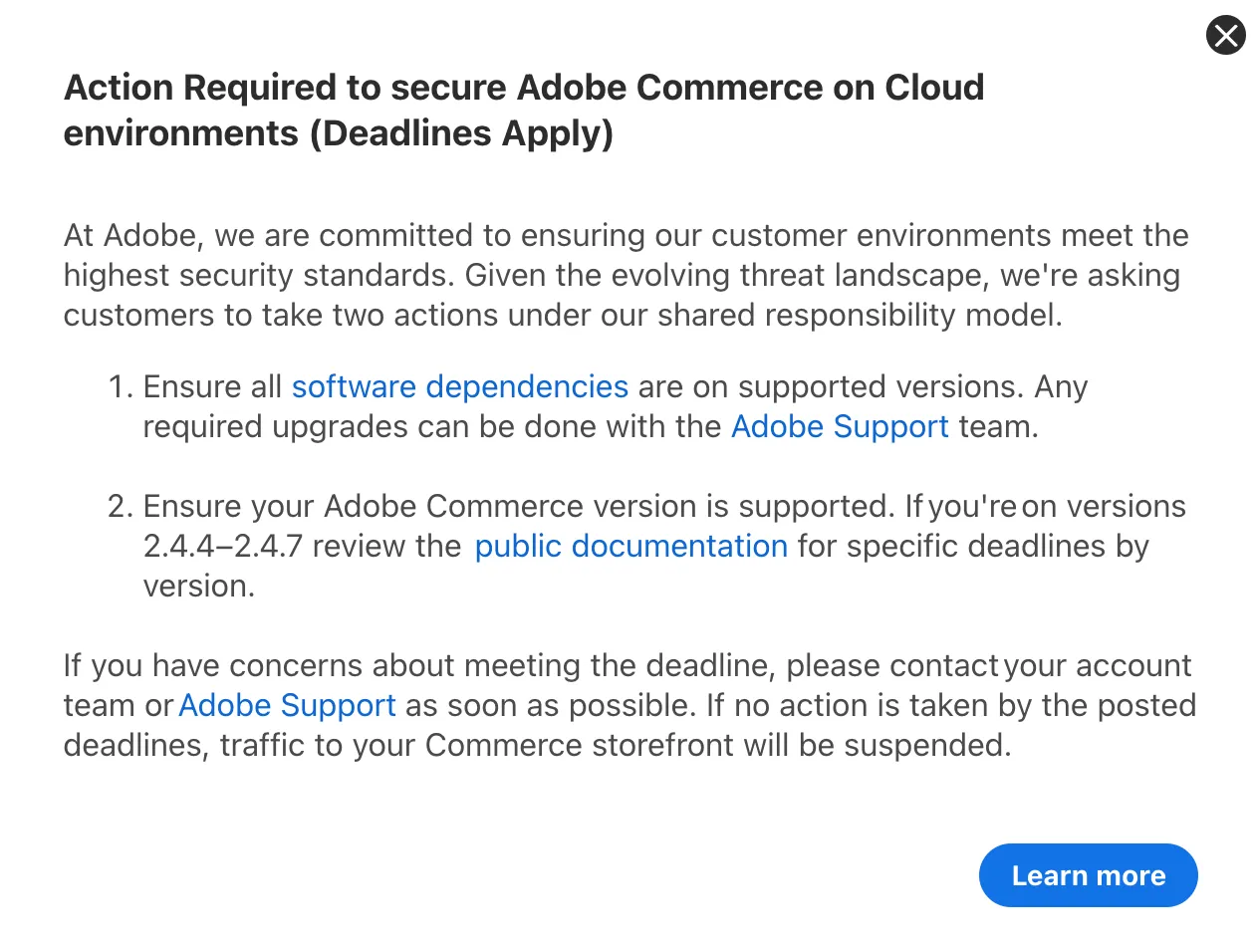
There is one loud consequence, but it is scoped narrowly. For merchants specifically on Adobe Commerce on Cloud (the managed PaaS offering), Adobe’s Security Enforcement Policy is explicit that missing the enforcement deadlines has a hard endpoint:
“If an environment has not met the security requirements by the enforcement dates shared above, Adobe will be forced to take appropriate action to maintain security of the Adobe Commerce platform and its customers. This includes suspending traffic to the affected infrastructure, and as a result your Commerce storefront will go offline.”
That storefront-suspension consequence is the “Action Required” warning shown in the admin screenshot above. It applies to Adobe Commerce on Cloud, not to self-hosted Magento Open Source. If you are self-hosted, nobody is going to switch your traffic off. The risk you carry instead is the quieter one: an unpatched, unsupported platform holding your entire catalog and checkout.
The Distinction That Matters: Open Source vs. Adobe Commerce
A lot of the reassurance circulating online applies to the paid product, not the free one, and the difference is the whole point for open-source stores.
Both Magento Open Source and paid Adobe Commerce ended regular support for 2.4.6 on the same date. What happens next is where they split. Adobe Commerce customers on 2.4.6 and 2.4.7 get an extra year of extended support at no additional cost, running to August 31, 2027. Open-source stores do not. Adobe’s Software Lifecycle Policy states it directly:
“Extended support security patches are available to Adobe Commerce customers only and are not available for the Magento Open Source code base.”
| Magento Open Source (free) | Adobe Commerce (paid) | |
|---|---|---|
| Regular support for 2.4.6 | Ended Aug 11, 2026 | Ended Aug 11, 2026 |
| Extended support cushion | None | Through Aug 31, 2027 |
| Storefront traffic suspension risk | No (self-hosted) | Yes, on Adobe Commerce on Cloud past enforcement dates |
If you are on Magento Open Source, you do not have the year of breathing room that paid customers do. That is not a reason to panic, but it is a reason to make the decision deliberately now rather than discovering the gap during an incident.
Your Two Honest Options: Upgrade or Re-Platform
There are exactly two responsible responses to being on an end-of-life line, and it is worth naming both honestly rather than pretending migration is the only answer.
Option 1: Upgrade to a Supported Magento Version
Moving to a currently supported release such as 2.4.8 or 2.4.9 keeps you on Magento and puts you back inside the support window. If Magento fits your team, your budget, and your operational appetite, this is the lower-risk move in the sense that your platform does not change. Upgrading directly to 2.4.8 or 2.4.9 also avoids landing on an intermediate line whose own support clock is already running down, which would just buy you another upgrade project sooner. The cost is real, though: a major Magento upgrade means dependency upgrades (PHP, the database engine, the search engine, the message queue), extension compatibility work, theme regression testing, and the hosting and specialist time that self-hosted Magento has always demanded.
Option 2: Re-Platform to Shopify
For a lot of teams, the end-of-life prompt is not really about this one upgrade. It is the moment they stop and ask whether they want to keep owning the full weight of a self-hosted commerce platform at all: the servers, the patching cadence, the specialist developers, the recurring upgrade projects. If that question has been sitting in the back of your mind, an EOL deadline is the natural trigger to move to a hosted platform where the security patching, PCI scope, and infrastructure are someone else’s responsibility. Shopify is the common destination for exactly that reason.
This post is not going to tell you Shopify is right for everyone; it is not. If you want the platform-versus-platform version of that argument, see Shopify vs. Magento vs. WooCommerce for bidirectional sync. What the rest of this post assumes is that you have decided to move, and it focuses on the part of that move that actually derails migrations: the product data.
Why the Product Data Is the Hard Part of a Shopify Move
Most Shopify migration guides spend their time on themes, DNS, and checkout. Those are the visible parts, and they are largely solved problems. The part that quietly consumes the timeline is the catalog, because Magento and Shopify model product data in fundamentally different ways.
Magento is built on an EAV (entity-attribute-value) model with attribute sets, configurable products assembled from simple children, and values that can be scoped per store view and per website. Shopify is built on a comparatively flat model: a product, up to three options, a set of variants, and metafields for anything that does not fit the fixed schema. Neither model is wrong, but a value that lives comfortably in one does not always have an obvious home in the other. That mismatch is where migrations stall, and it is the same class of problem covered in why Shopify migrations fail and in the field-level Shopify catalog migration walkthrough.
Mapping Magento’s Data Model onto Shopify’s
Here is where the friction actually lives, concept by concept. This is the map worth having before you export a single product, so the complexity is something you planned for rather than something you discover on launch week.
| Magento concept | Shopify target | The friction to plan for |
|---|---|---|
| Simple product | Product with a single variant | Mostly direct; watch weight, tax class, and status |
| Configurable product (parent + simple children via super attributes) | Product with options and variants | Shopify caps a product at 3 options; Magento configurables can use more super attributes, so some structures must be rethought |
| Attribute sets and EAV custom attributes | Metafields | Shopify has no concept of attribute sets; every custom attribute needs a mapped metafield definition |
| Dropdown / multiselect attributes (stored as option IDs) | Metafield values or tags | You must resolve option IDs to their human labels, not carry raw numeric IDs across |
| Category tree (nested hierarchy) | Collections (manual or smart, flat) | Magento’s nested tree flattens into collections; the hierarchy has to be re-expressed, often as smart-collection rules |
| Store views and websites (scoped, multi-language values) | Markets and translated content, or separate stores | Per-scope values must be split out per market instead of living on one record with scope overrides |
| Media gallery with image roles (base, small, thumbnail) | Product and variant images | Role semantics differ; variant-level image association has to be rebuilt |
| Tier and customer-group pricing | Limited natively; needs apps or Markets pricing | Magento’s pricing rules do not port one-to-one and need a deliberate mapping decision |
| URL keys | Handles plus 301 redirects | Preserve inbound SEO by mapping old URL keys to new handles with redirects |
| Weight, tax class, visibility, status, stock | Weight, tax, status, inventory | Largely maps, but the enumerations and defaults differ and need checking |
Two rows on that table cause the most pain in practice.
Configurable Products and the Three-Option Ceiling
A Magento configurable that varies on, say, color, size, and material, and length is four super attributes. Shopify allows three options per product. If your catalog has configurables that exceed three axes of variation, you cannot do a mechanical one-to-one import; you have to decide how to collapse or split them. Doing that decision product-by-product during a CSV import is how migrations run weeks over. Modeling it deliberately up front is the alternative, and it is the subject of modeling complex variants without SKU explosion.
Custom Attributes Becoming Metafields
Every non-standard attribute you built up in Magento (material, certifications, technical specs, whatever your category needs) has no native slot in Shopify’s fixed schema and has to become a Shopify metafield. That means resolving option IDs to labels, defining metafield structures, and deciding which attributes are worth carrying at all. This is exactly the terrain of product attributes and custom fields.
Using a PIM as the Migration Staging Layer
The reliable way to run this migration is to not move data directly from Magento into Shopify at all. You put a staging layer in between, transform and validate there, and only push clean, Shopify-shaped records into the destination. That staging layer is what a Product Information Management system is for.
In MicroPIM, the migration path works in four moves:
- Ingest and normalize from Magento. Pull the catalog out of Magento’s EAV structure and turn it into clean, flat records, with dropdown and multiselect option IDs resolved to their real labels rather than numbers. This becomes your single source of truth for the catalog, independent of either platform.
- Transform to Shopify’s model in one place. Map configurables to Shopify options and variants, custom attributes to metafield definitions, the category tree to collections, and scoped store-view values to per-market content, all as explicit rules rather than one-off spreadsheet edits. For the multi-language and multi-store side of that, see variants and multilingual catalogs.
- Validate before anything is pushed. This is the step that prevents the classic mid-import failure. Required fields, variant integrity, image associations, and metafield structure are checked in the PIM first, so a product missing data is caught before it reaches Shopify rather than failing on row 4,000 of a CSV. A pre-migration data audit surfaces the gaps while they are still cheap to fix.
- Push, then keep both sides in sync. Records go into Shopify through the API, and if you are running a phased cutover where both platforms are live for a while, the catalog stays consistent across them. The mechanics of that are covered in connecting MicroPIM to Shopify and keeping catalogs synced both ways.
The point of the staging layer is that the transformation and the validation happen somewhere you can inspect and correct, not inside the import itself. A CSV that fails halfway leaves you with a half-populated Shopify store and no clean way to tell what made it and what did not. A PIM that validates first means the data that reaches Shopify is data you already know is complete.
A Pre-Migration Checklist
Before you start moving anything, run through this. Most migration disasters trace back to skipping one of these:
- Confirm your exact Magento version and its support status, so you know whether you are choosing to upgrade or to re-platform, not drifting into either by default.
- Export a full catalog inventory: product counts by type (simple vs. configurable), attribute-set list, and total custom attributes.
- Identify every configurable product with more than three axes of variation, since those cannot map mechanically to Shopify.
- List custom attributes and decide which become metafields, which become tags, and which you drop.
- Resolve all dropdown and multiselect values from option IDs to labels before export.
- Map store views and websites to Shopify markets or separate stores, with a clear owner for each locale’s content.
- Plan URL-key to handle mapping and the 301 redirects that protect your existing SEO.
- Validate the transformed catalog for completeness in staging before the first push, not after.
Frequently Asked Questions
Is it safe to keep running Magento Open Source 2.4.6 or 2.4.5?
It runs, but it is no longer receiving regular support. Adobe states it will “no longer create further product changes for that version (including functional, quality, security, and PCI compliance changes).” New vulnerabilities will not get official patches for your version, and your PCI posture erodes over time. It is not an emergency shutdown, but it is rising, unmanaged risk on the platform holding your catalog and checkout.
Does Magento Open Source get the same extended support as Adobe Commerce?
No. Both ended regular support for 2.4.6 on the same date, but the one-year extended support cushion (through August 31, 2027 for 2.4.6 and 2.4.7) is for paid Adobe Commerce customers only. Adobe’s lifecycle policy is explicit that “extended support security patches are available to Adobe Commerce customers only and are not available for the Magento Open Source code base.”
Will Adobe shut off my store if I do not upgrade?
Only in one specific case. The storefront traffic-suspension consequence in Adobe’s Security Enforcement Policy applies to Adobe Commerce on Cloud (the managed PaaS) that miss the enforcement deadlines. If you are self-hosted on Magento Open Source, nobody switches your traffic off; the risk you carry is the unpatched-platform risk instead.
Do I have to migrate to Shopify, or can I just upgrade Magento?
You can upgrade. Moving to a supported line such as 2.4.8 or 2.4.9 keeps you on Magento and back inside the support window, and upgrading straight to a current release avoids landing on an intermediate version whose support clock is already running down. Migration to Shopify makes sense when the deadline is really prompting a broader question about whether you want to keep owning a self-hosted platform at all.
What is the hardest part of migrating product data from Magento to Shopify?
The structural mismatch between the two data models. Magento’s EAV attributes, attribute sets, configurable products, and per-store-view scoping do not map one-to-one onto Shopify’s flatter model of products, up to three options, variants, and metafields. Configurable products with more than three axes of variation and custom attributes that must become metafields are the two rows that cause the most rework, which is why staging and validating in a PIM before the push is the reliable approach.
What happens to my Magento attributes when I migrate to Shopify?
Standard fields like title, price, weight, and SKU map to Shopify’s native product and variant fields. Everything else, your custom EAV attributes and attribute sets, becomes a Shopify metafield, since Shopify has no attribute-set concept. Dropdown and multiselect values must first be resolved from Magento’s internal option IDs to their human-readable labels, otherwise you carry meaningless numbers across.
How long does a Magento to Shopify product data migration take?
It depends mostly on catalog size and how many custom attributes and configurable products you have, not on the number of SKUs alone. A small, simple catalog can move in days; a large catalog with heavy attribute customization and configurables that exceed Shopify’s three-option limit takes longer, because each of those needs a mapping decision. Staging and validating the data in a PIM first is what keeps the timeline predictable, because the rework happens before the import rather than during it.
Getting off end-of-life Magento without breaking the catalog starts with clean, validated product data. Start a free MicroPIM trial, pull your Magento catalog into a single source of truth, and validate it against Shopify’s data model before a single product goes live.